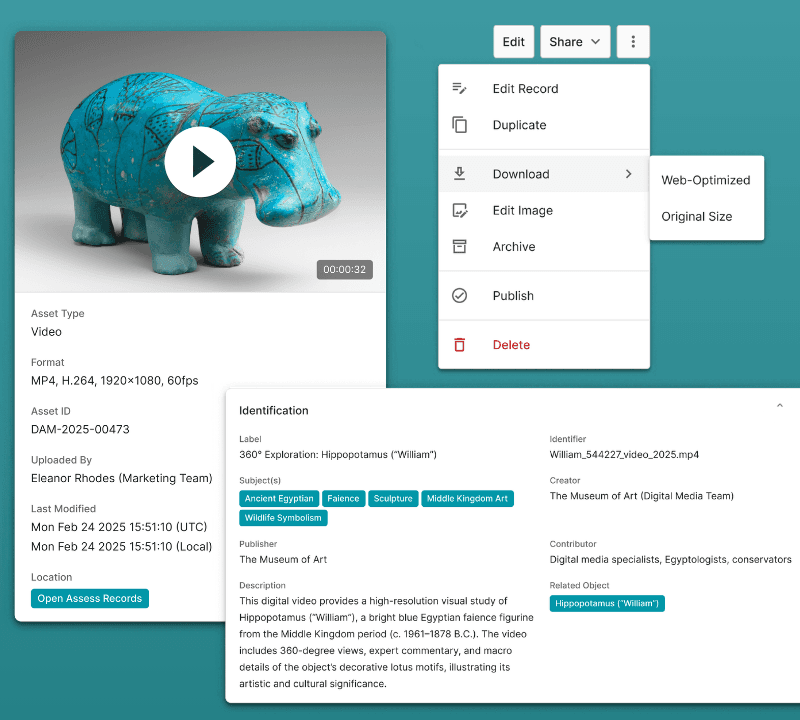
What is Digital Asset Management (DAM)?
Explore the ins and outs of digital asset management and why it matters—whether you work in museums, cultural heritage, or the corporate world.
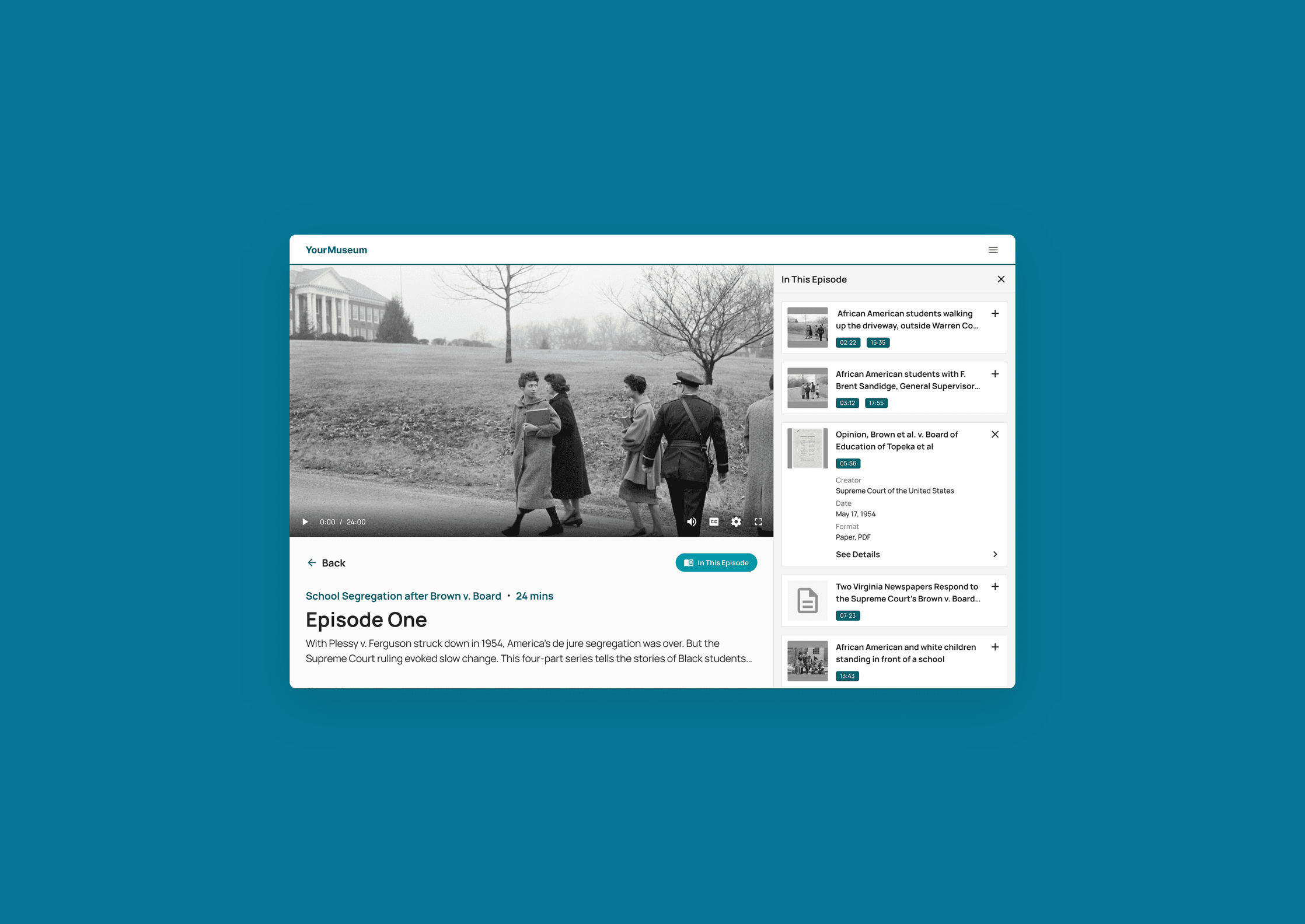
Between the rapid pace of digitization and the ease of creating born-digital content, institutions are managing more digital assets than ever. Without a system to remedy the digital chaos, those assets quickly become scattered, duplicated, and difficult to find.
Digital asset management (DAM) is the practice of organizing, storing, and distributing digital files from a centralized platform. DAM software provides a single, searchable library where every asset is tagged, version-controlled, and accessible to the people and systems that need it.
For museums and cultural institutions, that goes a step further, a digital asset management system must also connect to collections data, object records, and institutional workflows.
Without a DAM system, content lives everywhere. Queue the digital chaos: teams waste time looking for files, work from outdated versions, and risk using assets without checking rights or permissions.
DAM solves this by organizing your entire digital library and connecting it to the tools you already use. Read on for an in-depth look at its core benefits, who uses the software, and what DAM features to prioritize during a buyer’s journey.
For a deep dive into the role of DAM in cultural institutions, visit How Museums Can Benefit from Digital Asset Management.
Key takeaways
Without a DAM system, digital assets live everywhere. And the consequences of that? Wasted time, version errors, and compliance risks.
A DAM system ensures the right people can access the right assets at the right time, without relying on shared drives or manual file sharing.
The right DAMS grows with your institution, supporting everything from day-to-day workflows to long-term digital preservation.
What is a digital asset management system?
A digital asset management system (DAMS) is a centralized solution for managing, preserving, and sharing your digital assets. Often called the “single source of truth” in the DAM world, it serves as an important tool for organizing digital content across diverse teams and workflows.
At its core, a DAMS is both a platform and a practice. It supports functions like branding, marketing, production, and rights and licensing, bringing them together into a single, accessible environment.
Curious what DAM looks like in the real world? See how this works in practice →
Where standard DAM systems fall short for museum collections
Most DAM systems are designed to organize files, not objects. That works well for marketing teams and media libraries, but museums, archives, and cultural institutions have different needs entirely.
In a collections context, digital assets don’t exist in isolation.
One object might be associated with a tombstone record, condition reports, photography, loan history, and research materials. So, each piece is connected to the same physical item, but often scattered across separate systems or folders.
Traditional DAM systems struggle to represent these relationships. Assets get stored, but not meaningfully linked to the objects they belong to, leaving staff to manually piece together context that should be built into the system from the start.
A different approach: DAM built around the object record
Terentia takes a different approach to digital asset management: one that reflects how collections actually work.
Because the platform supports both DAM and collections management, it understands the structure of an object record and can replicate it within the system.
Teams can attach all relevant digital assets directly to an object record, maintain relationships between assets and metadata, and track the full lifecycle of an object in one place. You always have the full picture of every object’s digital ecosystem.
Collections records, digital assets, and metadata—all in one place. Explore how object-based DAM benefits your institution →
DAM case study: Theodore Roosevelt Presidential Library
Building a trusted AI digital repository
The Theodore Roosevelt Presidential Library set out to build something ambitious: an AI digital repository drawing on materials from 33 collections across 18 institutions. With AI, the team is generating metadata and transcripts at a scale that once took decades.
Built a private GPT, trained on verified primary and secondary sources
Achieved AI cataloguing confidence scores of 90%+
Restricted sensitive materials from AI processing via granular controls
Who uses digital asset management software?
DAM software is used across a broad range of industries and professional roles. Any team that creates, stores, or distributes digital content at scale can benefit from a dedicated DAM system.
Below are some of the most common use cases—with a special section for the museums and heritage sector, where Terentia has deep experience.
In museums
DAM teams: A DAM system is the operational backbone for digital asset managers, giving them the tools to oversee the full asset lifecycle. They use it to build workflows, set permissions, enforce metadata standards, and keep the system running smoothly for everyone else.
Collections teams: Collections managers and registrars rely on a DAMS to track, catalogue, and preserve digital assets, including digital surrogates of physical objects. It gives them a single source of truth for object records, making it easier to support loans, answer inquiries, and enable virtual access to collections.
Education teams: Education departments use DAM software to store, version, and organize digital learning resources. Controlled sharing features make it possible to distribute materials to students, educators, or community partners without opening up the wider system.
Marketing and events teams: From exhibition campaigns to updating the museum website, a DAM system keeps marketing and events teams organized and on-brand. Quick access to approved assets, along with their rights and usage information, removes bottlenecks and helps teams move faster.
Researchers: Researchers use a DAMS to manage the materials that underpin their work: images, documents, datasets, and associated records. It supports collaboration too, with custom permissions that make it easy to bring in external partners or share findings with the wider field.
Volunteers and interns: Temporary staff often handle digitization, data entry, and metadata work—all tasks that feed directly into the digital asset management system. Configurable permissions mean they can contribute meaningfully without accessing all parts of the system.
In other institutions
Marketing teams: Marketers use DAM software to store and organize media assets, campaign materials, brand guidelines and templates in one central location. It keeps teams aligned on approved assets, accelerates usage workflows, and helps maintain brand consistency across every channel.
Media teams: For media teams managing large volumes of video, audio, and photography, a DAM solution brings order to what can quickly become an unwieldy archive. It supports fast retrieval, rights tracking, and smooth handoffs between production and distribution.
Product teams: Product teams use a DAM system to manage the visual and technical assets tied to their products, including images, specs, and design files. Keeping these organized and accessible helps maintain consistency across channels and speeds up go-to-market workflows.
Sales teams: A DAMS gives sales teams on-demand access to the pitch decks, case studies, and marketing collateral they need to close deals. With everything in one place and permissions easy to manage, it’s simpler to keep materials current and ensure reps are always working from the latest versions.
IT teams: Information technology professionals often play a supporting role in deploying, integrating, and maintaining a DAM platform. They ensure the software connects securely with other platforms, manage user access at an administrative level, and oversee data security and compliance across the organization.
DAM means something different to every institution. Explore how our community is using DAM software →
DAM case study: Junaluska Museum
Preserving heritage on sovereign terms
After damage to the museum led to its closure, Junaluska Museum needed a digital home for its Eastern Band of Cherokee Indians' collections that would uphold and respect the tribe’s data sovereignty.
Launched a 100% virtual museum within months of training
Gave the community access to archival photos, records, and 3D models
Upholds full data sovereignty, including from the DAMS vendor
Benefits of digital asset management
DAM software does far more than just store files. The right system creates a ripple effect across your entire organization—from how teams find and share digital assets to how well your data stays protected.
These are just some of the benefits of digital asset management:
Accessibility: DAM software makes digital assets available to the right people at the right time, whether staff are working on-site or remotely. Cloud-native storage means teams across your institution can access what they need without relying on local drives or emailing files back and forth.
Organization: Without a structured system, digital assets quickly become difficult to manage and scattered across drives, inboxes, and shared folders with inconsistent naming conventions. A DAM system brings everything into one place, with metadata schemas that keep even large, fast-growing digital repositories organized and under control.
Discoverability: Finding the right asset shouldn't require knowing exactly where it was saved or who uploaded it. Flexible search functionality—including AI-powered retrieval—helps staff locate images, documents, and records quickly, without needing precise search terms or specialist knowledge of the system.
Context: For institutions with collections, understanding the relationship between a digital asset and the object it belongs to—its history, condition, and use across the institution—is just as important as being able to store and find it. A DAM system that links assets directly to object records gives teams the full picture.
Collaboration: A DAMS breaks down the silos that form when teams store assets in separate drives or systems. Shared access, version control, and configurable permissions make it easier for internal users and external partners to work from the same materials without stepping on each other’s work.
Security: Granular, role-based permissions ensure that sensitive materials—condition reports, donor records, unpublished research—are only accessible to those who need them. Audit trails and version history add an extra layer of accountability across the organization.
Compliance: Managing rights, licensing, and authorized usage is a constant challenge for institutions working with large image collections and public-facing content. A DAM solution centralizes this information alongside the assets themselves, reducing the risk of unauthorized use and making compliance easier to maintain at scale.
Innovation: By lifting the administrative burden of managing assets, teams are free to focus on what they do best. A well-implemented DAMS creates the foundation for new initiatives—from digital exhibitions and online learning resources and expanded public access programs.
DAM case study: Placer County Museums
Streamlining workflows at a small institution
When Placer County Museums’ existing system came up for renewal, staff used it as an opportunity to find a DAM that worked for them. With over 60,000 records and 5 TB of material to manage, the time savings started at ingestion.
Reduced ingestion time by 50%
Eliminated file-by-file processing with bulk metadata editing
Got a one-person team up and running with minimal training
DAM features to look for
Not all DAM systems are created equal. Here are the key features to evaluate when choosing the right platform for your institution.
Cloud-native storage
Securely store and access digital assets from anywhere via the internet. A cloud-native DAM system offers infinite scalability, enterprise-level security, and disaster recovery, making it able to lighten an institution’s IT load while scaling in pace with its growth.
Flexible metadata schemas
Without any coding or developer support, your digital asset manager can configure the data architecture with linked data, controlled vocabularies, and taxonomy-based classifications. Teams can organize, tag, and retrieve assets based on their own unique needs.
Role-based access
Granular permissions give administrators precise control over which users, departments, and groups can view, edit, or download digital assets, keeping your collections secure without creating unnecessary barriers to access.
Version control and lifecycle management
Track changes, maintain version history, and prevent duplication and loss. A centralized repository ensures everyone can find what they need, eliminating the siloed workflows that slow teams down.
AI-powered tools
Modern DAM systems often leverage artificial intelligence to reduce manual effort and surface better insights. Look for AI-powered features like automated metadata tagging, optical character recognition (OCR), and context-aware search that deduce the meaning behind a query, not just the keywords.
Intuitive search
Advanced search and retrieval—ideally powered by AI—makes locating assets fast and straightforward. Flexible and fuzzy search functionality can improve discoverability without requiring Boolean queries or highly specific search terms.
Built-in digital preservation
A DAM system with digital preservation tools ensures your assets remain accessible and usable over the long term. Look for features like file format migration, integrity checking, and audit trails that protect against data loss or bit rot.
Effortless integration
A purpose-built DAMS connects smoothly with your collections management system and the rest of your GLAM software stack, creating a cohesive digital ecosystem across your institution. Check for integrations with tools like productivity apps, creative tools, and web publishing platforms.
Digital rights and licensing
Manage copyright, licensing, and authorized usage directly within the digital asset management system. This is especially important for public-facing content such as exhibition materials, website imagery, and third-party media.
Every collection has its own requirements. Discover how this would work for yours →
DAM case study: Mote Marine Laboratory & Aquarium
Unifying a multi-department organization
With more than 20 departments, eight locations, and assets ranging from research papers and blueprints to event photography and educational curricula, Mote Marine Laboratory & Aquarium needed a DAM flexible enough to work for everyone.
Configured 30+ asset types across departments
Managed access with department-level permissions
Made encyclopedia records for Aquarium species, linked to digital assets and published to the website via API
Transform your DAM with Terentia
Managing a growing digital library shouldn’t slow your teams down. Terentia gives institutions the tools to get it under control—and keep it that way.
Discover what makes our next-generation platform different:
Purpose-built flexibility: Developed by a team with deep industry expertise, Terentia supports your workflows through its configurable, schema-based architecture.
Unlimited storage and users: Scale without barriers. Terentia supports up to 197 TB of data per file on Microsoft Azure, with unlimited users and no per-licence fees.
Digital preservation and security: Built with long-term preservation in mind. Safeguard your assets with a single-tenant solution featuring automatic security updates and advanced protection.
AI-powered DAM: Automate common tasks, make videos and unstructured content searchable, and build smarter relationships across your data.
Seamless integration: Add Terentia to your software stack with native integrations for the tools your teams already rely on.
Free training and support, always: Forgot how a feature works? A Terentia team member will jump on a call to help, at no charge, whenever you need it.
Want a no-pressure tour? Request a personalized walkthrough to see how Terentia can transform how you approach DAM.
FAQs: Digital asset management
What counts as a digital asset?
A digital asset is any file or media item stored in digital form that your institution uses, shares, or preserves, such as images, video, audio, documents, presentations, graphics, and 3D files.
What is a digital asset manager?
A digital asset manager is the staff member responsible for the oversight of an institution’s digital assets and its DAM system. Their main role is ensuring that assets remain secure, searchable, and shareable while following best practices for their management and use.
How much does a digital asset management system cost?
The cost of a DAM system varies widely depending on the vendor, the size of your institution, and your storage needs.
Terentia's pricing is scalable, transparent, and built on a modular subscription model, so you only pay for what you need. Smaller institutions can also take advantage of the Small Museum Initiative, designed to support museums making the move to a new DAM.
How can I easily share digital assets?
Sharing capabilities vary between digital asset management systems, so it’s worth knowing what to look for.
With Terentia, you can share assets directly from the platform. No external file-sharing tools required. Send a single file or select a batch to create a shareable virtual folder called a Lightbox. Either way, granular access controls mean you stay in complete control of what recipients can see and do.
Glossary: Digital asset management
Digital asset management comes with its own vocabulary. Whether you’re evaluating DAM options or onboarding your team, this glossary covers the terms you’ll likely encounter.
API: A rule or standard that allows different applications in your software stack (e.g., your CMS and DAMS) to communicate with each other.
Bit rot: The gradual deterioration over time of data stored on physical digital media, such as hard disks, CDs, and USB drives. Also called bit decay, data decay, or data rot, it can cause digital files to become inaccessible or lost.
Cloud-native: An approach to building applications that are designed to run in cloud environments, allowing users to securely access and manage digital files from anywhere via the internet.
Data migration: The process of transferring data from one environment to another. For example, moving metadata from a previous DAMS to a new one.
Digital asset: An item was digitized or created digitally (also called born digital). Examples include photos, videos, audio files, 3D models, digital blueprints, and documents like PDFs, presentations, and spreadsheets.
Digital preservation: The planned procedures and practices required to ensure your digital assets remain accessible and usable over the long term.
Governance: The standards, structures, policies, and procedures that define how your digital assets are managed throughout their lifecycles. This may include metadata standards, access controls and permissions, preservation policies, workflows, and security protocols.
Interoperability: The ability of your digital systems to share, exchange, and use data with one another without requiring extensive custom coding or developer intervention.
MD5 checksum: A method of verifying data integrity by generating a unique digital fingerprint for a file. It confirms that a received file matches the original and has not been altered or corrupted.
Metadata: Structured data that describes your digital assets, enriching their context and increasing discoverability in a DAMS. Metadata standards (e.g., Dublin Core, custom taxonomies, etc.) help ensure consistency across assets.
On-prem(ise): Software and hardware that are physically hosted at your institution, rather than accessed through the cloud.
Scalability: A digital system's capacity to handle growth over time—such as more users, digital assets, or stored data—without a decline in performance.
Schema: A structured framework that defines how metadata is organized and how it relates to other data within your digital systems. Well-designed schemas enforce consistent formatting, making it easier to locate and manage object records.
Single-tenant solution: A dedicated software environment—usually in the cloud—in which your institution is the only organization using that particular environment and its resources aren’t shared with others.
Software as a service (SaaS): A software delivery model in which applications are hosted in the cloud, maintained by a vendor, and accessed through a web browser. Because the vendor manages infrastructure, hosting, and updates, SaaS reduces the IT burden on your team.
Taxonomy: A classification system that organizes your assets into logical categories based on shared characteristics. Helps your DAMS users quickly locate assets and information.
Versioning: The practice of tracking changes to digital assets and data over time. Versioning maintains a historical record of modifications, allowing your team to revert to earlier versions when needed.
Browse our resources


Enjoyed the read?
Stay in the loop with Terentia. Join our mailing list for GLAM professionals to get new blogs, case studies, guides, and more great content delivered to your inbox.
